Kubernetes Networking Explained: A Deep Dive
What is Kubernetes networking?
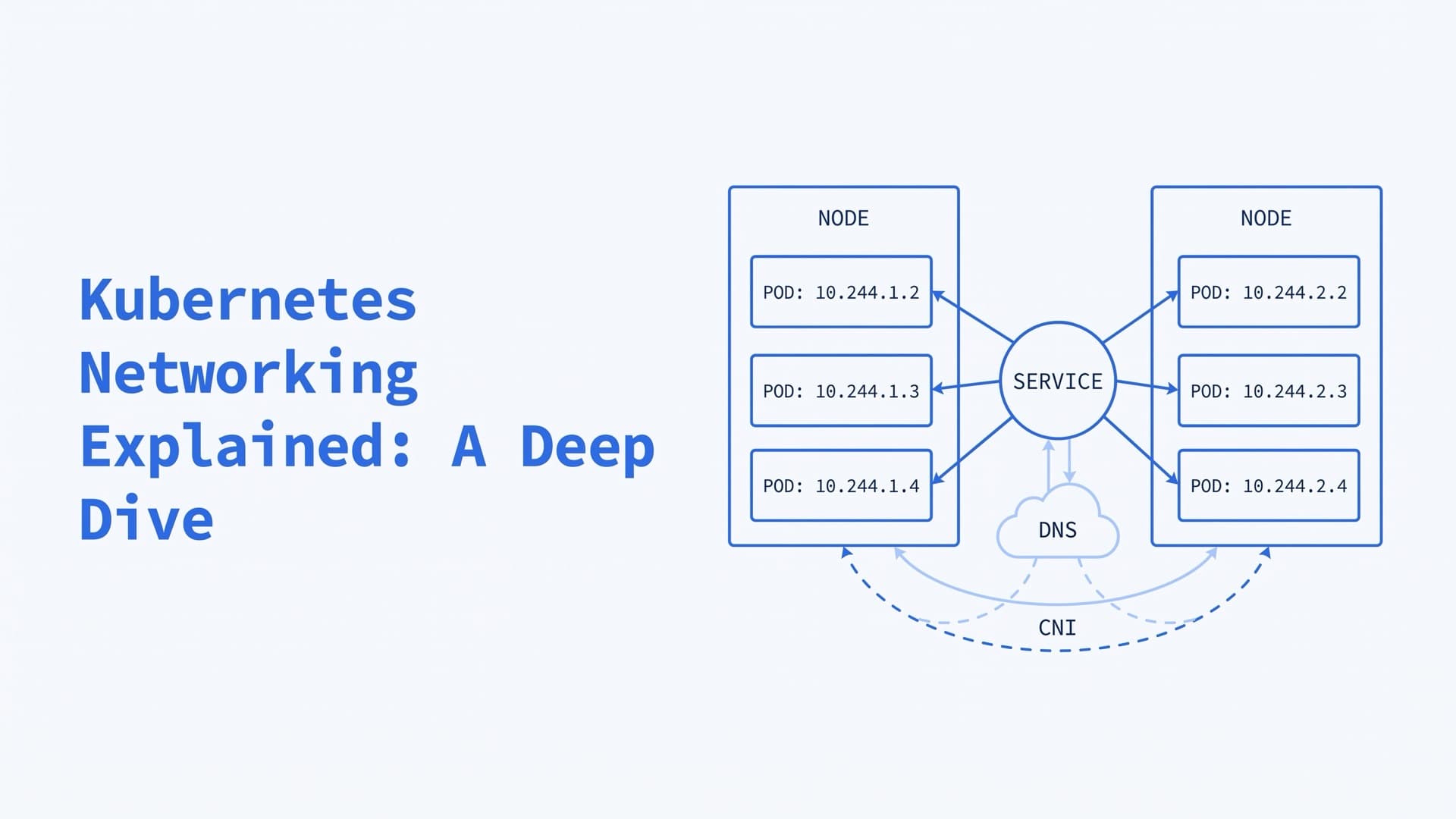
Kubernetes networking is how pods, Services and outside clients reach each other in a cluster. Every pod gets its own IP address, and any pod can reach any other pod without NAT. A CNI plugin builds this pod network. kube-proxy or a replacement routes Service traffic, and CoreDNS gives Services stable names.
Kubernetes defines the rules and the APIs. Add-ons you choose do most of the work, so two clusters can move the same packet in very different ways.
This guide goes layer by layer, from the network model to troubleshooting. The deep-dive section shows the commands to trace one pod's traffic on a node. Version details reflect Kubernetes 1.37, the current release in October 2026.
How the Kubernetes networking model works
The Kubernetes network model comes down to four rules:
- Each pod gets its own IP address, unique across the cluster.
- Containers in a pod share one network namespace. They talk to each other over
localhost. - Every pod can reach every other pod on any node, without proxies or NAT, unless you segment the network on purpose.
- Agents on a node, such as the kubelet, can reach all pods on that node.
The result is one flat address space. The docs say pods "can be treated much like VMs or physical hosts" for ports, naming, service discovery and load balancing.
Kubernetes implements only a few parts of this model itself. The rest comes from components you install:
| Part | Provided by |
|---|---|
| Pod network namespace | The container runtime, such as containerd or CRI-O |
| Pod network | A CNI plugin, such as Calico, Cilium or Flannel |
| Service routing | kube-proxy, or the network plugin's own proxy |
| NetworkPolicy | Usually the network plugin |
| Gateway API | One of many implementations |
This split explains a common surprise. If your plugin doesn't implement NetworkPolicy, the API still accepts policies, and they have no effect.
The four types of Kubernetes networking
The Cluster Networking docs split the job into four problems:
| Traffic | Solved by |
|---|---|
| Container to container | A shared network namespace and localhost |
| Pod to pod | The pod network, built by the CNI plugin |
| Pod to Service | Services, kube-proxy and cluster DNS |
| External to Service | NodePort, LoadBalancer, Ingress or Gateway API |
Traffic that leaves the cluster, called egress, is a fifth path. By default, a pod may connect to anything. Network policies can restrict that, as shown later.
Kubernetes cluster networking: IP ranges for nodes, pods and Services
A cluster needs three IP ranges that don't overlap:
- Node IPs come from the machines' own network. The kubelet or the cloud-controller-manager assigns them.
- Pod IPs come from the network plugin.
- Service IPs, also called ClusterIPs, come from the kube-apiserver's
--service-cluster-ip-range.
The examples in this article use a typical layout for a kubeadm cluster:
| Network | Example range | Set by |
|---|---|---|
| Nodes | 10.0.0.0/24 | Your VPC or LAN |
| Pods | 10.244.0.0/16, a /24 per node | kubeadm's --pod-network-cidr, or the plugin's own IPAM |
| Services | 10.96.0.0/12 | kubeadm's default --service-cidr |
The pod range is the default in Flannel's manifest, and each node gets a /24 slice of it, such as 10.244.1.0/24. kubeadm gives cluster DNS the tenth address of its default Service range, 10.96.0.10.
Take your ranges from the RFC 1918 private blocks, and keep them clear of your VPC, peered networks and VPNs. If pod IPs are routable outside the cluster, they must be unique across the wider network. Since Kubernetes 1.33, you can add Service ranges later with ServiceCIDR objects.
Dual-stack networking has been stable since Kubernetes 1.23. It gives each pod one IPv4 and one IPv6 address. It needs pod and Service ranges for both families, nodes with routable IPv4 and IPv6 interfaces, and a network plugin that supports it. A Service picks its families with .spec.ipFamilyPolicy, set to SingleStack, PreferDualStack or RequireDualStack.
How Kubernetes pod networking works on a node
Three Linux features do the work on each node.
Network namespaces. A network namespace gives processes their own network devices, IP stack, routing tables, firewall rules and port numbers. Linux has eight namespace types, and the network namespace is the one that matters here. Every pod gets its own.
veth pairs. A veth pair is two virtual Ethernet devices joined like a pipe. A packet sent into one end comes out of the other. One end sits in the pod as eth0. The other end stays on the host.
A bridge. With the CNI bridge plugin, the host ends plug into a Linux bridge, a virtual switch in the host's namespace. Pods on the same node reach each other through it. Other plugins wire the host end differently, but every pod still gets a namespace and an interface.
The pause container ties it together. It holds the pod's namespaces, and the app containers join them. The CNI spec requires the runtime to create the network namespace before it calls any plugin.
A pod with hostNetwork: true uses the node's network namespace instead, so it shares the node's IP address and ports.
What is CNI in Kubernetes?
CNI, the Container Network Interface, is a small contract between a container runtime and network plugins. A plugin is an executable. The runtime runs it with a command such as ADD or DEL, passes the network config on stdin and reads a JSON result back.
When a pod starts, the runtime calls ADD. The main plugin creates the pod's interface, usually gets an address from an IPAM plugin, and sets up routes. Chained plugins can adjust the result afterwards, for example to map host ports.
Since Kubernetes 1.24, only the container runtime manages CNI plugins. That release removed the kubelet's --network-plugin and --cni-bin-dir flags. In containerd, the defaults are /etc/cni/net.d for config files and /opt/cni/bin for plugin binaries.
Here is a minimal config for the bridge plugin on a node that owns 10.244.1.0/24. It goes in /etc/cni/net.d/:
{
  "cniVersion": "1.0.0",
  "name": "pod-network",
  "type": "bridge",
  "bridge": "cni0",
  "isGateway": true,
  "ipMasq": true,
  "ipam": {
    "type": "host-local",
    "ranges": [[{"subnet": "10.244.1.0/24"}]],
    "routes": [{"dst": "0.0.0.0/0"}]
  }
}
What the fields do, per the bridge plugin docs:
"type": "bridge"plugs every pod on the node into one Linux bridge, herecni0."isGateway": truegives the bridge an IP address, so it becomes the pods' default gateway."ipMasq": truemasquerades traffic from the node's pod subnet to anything outside that subnet, including pods on other nodes. The NAT section shows how to check it.- The host-local IPAM plugin hands out addresses from the node's range, with the gateway at .1 by default. It keeps its state on the node's disk, so addresses are unique per node.
If a pod needs more than one interface, Multus is a CNI plugin that attaches extra ones.
Kubernetes networking deep dive: trace a pod on your own node
You can check each layer above on a live node. The steps below trace one pod in the example cluster, on a node that owns 10.244.1.0/24. They assume containerd and the cni0 bridge, which the bridge plugin and Flannel create by default. Other plugins use other names, but the steps carry over. Run the node commands as root.
1. Find the pod's node. kubectl get pod <pod> -o wide shows the node and the pod's IP. Open a shell on that node.
2. Find the pod's pause container. On containerd, every pod starts with a pause container, the pod's sandbox. It runs no app code. Its job is to hold the pod's network namespace, which the app containers then join. That is why all containers in a pod share one IP address and one localhost. kubectl doesn't list the pause container, but crictl asks the runtime directly:
crictl pods --name <pod>    # the sandbox ID
crictl inspectp <pod-id>    # look for "pid" and "cniResult"
lsns -t net                 # one /pause process per pod
The pid field is the pause process, and cniResult shows what the CNI plugin set up. lsns lists the network namespaces on the node, and each pod's namespace shows its /pause process.
3. Look inside the pod's network namespace. The namespace is the pod's private copy of the network stack, with its own interfaces and routes. nsenter runs the node's own tools inside it, using the pause container's PID:
nsenter -t <pid> -n ip addr
nsenter -t <pid> -n ip route
You should see lo and eth0 with the pod's IP. The interface shows as eth0@ifN, where N is the index of its veth peer on the node. The default route points at the bridge, 10.244.1.1 on this node.
4. Find the node's end of the veth pair.
ip -o link | grep "^N:"
ip link show master cni0
The first command shows that veth and the bridge it plugs into. The second lists every port on cni0, one per pod on the node.
5. Check the node's routes. On the node, ip route shows 10.244.1.0/24 going to cni0. Routes to other nodes' pod subnets come from the network plugin or the cloud, as the next section shows.
For a longer walkthrough with captured output, see Nicolas Leiva's Kubernetes Networking: Behind the scenes. He traced a cluster built with Kelsey Hightower's Kubernetes The Hard Way in 2018, so some tools and defaults have changed since.
How do pods on different nodes communicate?
The bridge plugin gives each node a route to its own pod subnet only. In the example cluster, node 1 owns 10.244.1.0/24 and node 2 owns 10.244.2.0/24. A packet from a pod on node 1 to a pod on node 2 must leave node 1. The network then has to know that 10.244.2.0/24 sits behind node 2. Something has to add a route for each node's slice, or carry pod traffic inside packets between node IPs.
The smallest setups add one static route per node, as Kubernetes The Hard Way does. On node 1, for example:
sudo ip route add 10.244.2.0/24 via <node-2-ip>
Production clusters leave this to the network plugin or the cloud. There are three common approaches:
| Approach | How packets cross nodes | Examples |
|---|---|---|
| Overlay | Encapsulated in VXLAN, Geneve or IP-in-IP | Flannel, Calico, Cilium |
| Routed | Routes to each pod subnet, static or via BGP | Calico, Cilium, Flannel host-gw |
| VPC-native | Pods get addresses from the cloud network | Amazon VPC CNI, GKE, Azure CNI Pod Subnet |
An overlay runs on almost any network, because the network underneath only sees node IPs. It costs some CPU, the extra header shrinks the usable packet size, and pod IPs can't be reached from outside the cluster. Routed and VPC-native setups skip the encapsulation. In exchange, the network must carry pod routes, and pods use up real addresses. With the Amazon VPC CNI, each pod gets a private address from your VPC. On GKE VPC-native clusters, pod IPs are routable across the VPC and peered VPCs.
On bare metal, there is no cloud router to hold pod routes. Plugins such as Calico can peer with your routers over BGP or build an overlay instead. We moved a long-term client's big-data platform onto on-prem Kubernetes, and we still run those clusters, from version upgrades to moving their databases in.
Does Kubernetes use NAT between pods?
The model says pod-to-pod traffic needs no NAT, and routing alone meets that rule. Some setups add NAT anyway. With "ipMasq": true, the bridge plugin masquerades everything that leaves the node's pod subnet, except multicast. A pod on another node then sees the sending node's IP as the source. To check a node, list its NAT rules and the tracked connections to a remote pod:
sudo iptables -t nat -S POSTROUTING
sudo conntrack -L -d <remote-pod-ip>
In a conntrack entry, the first src= is the sender and the second dst= is where replies go. If replies go to the node's IP, the source was masqueraded.
NAT still has a job at the edge of the cluster. In an AKS overlay network, for example, traffic that leaves the cluster is translated to the node's IP. Inside the cluster, kube-proxy uses destination NAT to send Service traffic to a pod, as the next section shows.
How Kubernetes Services and kube-proxy work
Pod IPs change every time a pod is replaced. A Service gives a set of pods one stable virtual IP and a DNS name. The control plane lists the pods behind it in EndpointSlices, with up to 100 endpoints per slice by default. On every node, kube-proxy watches Services and EndpointSlices and programs the node to forward Service traffic.
| Type | Reachable from | How |
|---|---|---|
| ClusterIP | Inside the cluster | A virtual IP, the default type |
| NodePort | Every node's IP | A port from 30000–32767 on each node |
| LoadBalancer | Outside the cluster | An external load balancer |
| ExternalName | Inside the cluster | A DNS CNAME, no proxying |
A headless Service sets clusterIP: None. It gets no virtual IP, kube-proxy ignores it, and DNS returns the pod IPs directly.
Outside traffic reaches Services through a NodePort, a LoadBalancer Service, Ingress or Gateway API. The Ingress API is frozen, and Kubernetes recommends Gateway API instead. Ingress NGINX, one of the most popular Ingress controllers, was retired in March 2026. Its repository is now read-only, and it gets no more releases or security fixes. The Kubernetes load balancing guide covers all four options, and our Kubernetes Ingress guide covers the move off Ingress NGINX.
The older Endpoints API has been deprecated since Kubernetes 1.33, and kubectl get endpoints now prints a warning. It can't represent dual-stack Services and truncates long endpoint lists. Query EndpointSlices by label instead:
kubectl get endpointslice -l kubernetes.io/service-name=myservice
How kube-proxy sends Service traffic to a pod
A Service IP isn't answered by any single host. kube-proxy programs every node to capture traffic to the Service's IP and port and send it to one of its endpoints. In iptables mode, the nat table's PREROUTING and OUTPUT chains jump to KUBE-SERVICES. A rule there matches the Service's IP and port and jumps to a KUBE-SVC- chain for that Service. That chain picks one endpoint at random through the statistic match. Each endpoint has a KUBE-SEP- chain that rewrites the destination to the pod's IP and port.
A NodePort enters through the KUBE-NODEPORTS chain. It matches the port and jumps to the Service's KUBE-EXT- chain for external traffic. With the default traffic policy, that chain passes the packet on to the same KUBE-SVC- chain. If the chosen pod runs on another node, the receiving node forwards the packet.
By default, kube-proxy also source-NATs NodePort traffic, so the pod sees a node's IP as the client. LoadBalancer Services behave the same way. externalTrafficPolicy: Local keeps the client IP, but a node with no ready local pod drops the traffic. Troubleshooting step 5 shows how to print these rules on a node.
kube-proxy modes in 2026: iptables, nftables and IPVS
The proxy mode decides how kube-proxy programs a node:
| Mode | Status in 1.37 | Notes |
|---|---|---|
| iptables | Default on Linux | Rules grow with Services and endpoints |
| nftables | Stable since 1.33 | Needs kernel 5.13+, planned future default |
| ipvs | Deprecated since 1.35 | Off by default in 1.40, removed in 1.43 |
| kernelspace | Windows only | Programs the Windows VFP |
The docs advise setting the mode explicitly in every cluster, so an upgrade can't change it. Moving to nftables changes two NodePort behaviors. NodePorts answer only on the node's primary IP, and kube-proxy stops adding firewall accept rules for them.
Some plugins replace kube-proxy entirely. Cilium, for example, load-balances Services in eBPF at the socket level. On such clusters, the iptables chains above don't apply, so use the plugin's own tools.
How does DNS work in Kubernetes?
CoreDNS is the default cluster DNS. It runs as pods in kube-system, behind a Service still named kube-dns for backward compatibility. In the example ranges, that Service sits at 10.96.0.10.
The kubelet writes each pod's /etc/resolv.conf. A pod in the namespace payments gets a file like this:
nameserver 10.96.0.10
search payments.svc.cluster.local svc.cluster.local cluster.local
options ndots:5
Records follow a fixed pattern:
- A Service gets an A or AAAA record,
my-svc.my-namespace.svc.cluster.local, that points to its ClusterIP. - A headless Service's name returns the IPs of its pods.
- Named ports get SRV records, such as
_http._tcp.my-svc.my-namespace.svc.cluster.local.
The search list lets pods use short names. From namespace test, the name data finds the Service data in test, and data.prod finds it in prod. The ndots:5 option has a cost. A name with fewer than five dots is tried with each search domain first, so one lookup for api.example.com can turn into several queries.
On busy clusters, NodeLocal DNSCache runs a DNS cache on every node. Pods query the cache on their own node, so those queries skip DNAT and connection tracking. The cache sends misses on to CoreDNS.
How do Kubernetes network policies work?
NetworkPolicy is a firewall for pods at layers 3 and 4. Without any policy, every pod accepts traffic from anywhere and can send it anywhere. A policy that selects a pod isolates it in the directions the policy lists. From then on, only connections that some policy allows get through. Inbound traffic from the pod's own node, such as kubelet health checks, is still allowed.
Three rules shape every policy set:
- Policies only add. The allowed traffic is the union of all policies that apply, so order never matters. There are no deny rules.
- Both ends must agree. A connection needs egress allowed at the source pod and ingress allowed at the destination pod.
- The plugin enforces them. Without a plugin that supports NetworkPolicy, policies are stored and ignored.
Start each namespace with a default deny in both directions:
apiVersion: networking.k8s.io/v1
kind: NetworkPolicy
metadata:
  name: default-deny-all
  namespace: payments
spec:
  podSelector: {}
  policyTypes: ["Ingress", "Egress"]
A default deny on egress also blocks DNS, so add DNS back first. This policy lets every pod in the namespace reach CoreDNS, whose pods carry the k8s-app: kube-dns label:
apiVersion: networking.k8s.io/v1
kind: NetworkPolicy
metadata:
  name: allow-dns
  namespace: payments
spec:
  podSelector: {}
  policyTypes: ["Egress"]
  egress:
  - to:
    - namespaceSelector:
        matchLabels:
          kubernetes.io/metadata.name: kube-system
      podSelector:
        matchLabels:
          k8s-app: kube-dns
    ports:
    - protocol: UDP
      port: 53
    - protocol: TCP
      port: 53
Then allow each flow your apps need. This policy lets pods labeled app: backend reach the database pods on port 5432:
apiVersion: networking.k8s.io/v1
kind: NetworkPolicy
metadata:
  name: backend-to-postgres
  namespace: payments
spec:
  podSelector:
    matchLabels:
      app: postgres
  policyTypes: ["Ingress"]
  ingress:
  - from:
    - podSelector:
        matchLabels:
          app: backend
    ports:
    - protocol: TCP
      port: 5432
Because egress is denied too, the backend pods also need an egress policy that allows app: postgres on port 5432. Watch for three common mistakes:
- Selector indentation.
namespaceSelectorandpodSelectorin one list item mean both must match. As two items, either one is enough.kubectl describe networkpolicyshows how Kubernetes read the policy. - ipBlock for pods.
ipBlockis meant for addresses outside the cluster, since pod IPs change. - Expecting more than layer 4. NetworkPolicy can't target Services by name, log blocked connections or handle anything TLS-related.
For rules that cover the whole cluster, SIG Network is developing ClusterNetworkPolicy, an alpha API at policy.networking.k8s.io/v1alpha2. Calico 3.32 supports it. Amazon EKS has its own ClusterNetworkPolicy in the networking.k8s.aws/v1alpha1 group, with VPC CNI 1.21 or later. Calico and Cilium also have their own policy APIs. Network policies are one layer of cluster security, and the Kubernetes security checklist covers the rest.
Kubernetes networking options: Calico vs Cilium vs Flannel
Most Kubernetes networking solutions are CNI plugins. The one you pick decides how packets cross nodes and whether network policies work.
| Plugin | Moves packets with | NetworkPolicy |
|---|---|---|
| Flannel | VXLAN (recommended), host-gw or WireGuard | Needs an add-on |
| Calico | VXLAN or IP-in-IP overlay, or BGP routing | Yes, plus its own API with tiers and global policies |
| Cilium | VXLAN or Geneve overlay, or native routing | Yes, plus its own API with L7 and DNS rules |
| Cloud CNIs | VPC addresses or a provider overlay | Depends on the provider |
Flannel describes itself as a simple way to build a layer 3 network for Kubernetes. It moves traffic between nodes, and its daemon doesn't enforce network policies. Its Helm chart can deploy the Kubernetes SIGs policy controller alongside it, or you can pair it with Calico.
Managed clusters often decide for you. On EKS, the Amazon VPC CNI is the only CNI that AWS supports for nodes on AWS infrastructure. You can install another plugin, such as Calico or Cilium, with support from its vendor or your own team. EKS Auto Mode doesn't support other plugins, and Fargate nodes run only the VPC CNI. GKE Dataplane V2 is built on Cilium. AKS Automatic uses Azure CNI powered by Cilium by default.
Calico or Cilium?
Neither wins everywhere. Both enforce standard NetworkPolicy, both can encrypt pod traffic with WireGuard, and both offer an eBPF data plane. They differ in where they fit best:
- Calico fits mixed Linux and Windows clusters, and teams that want a choice of data planes, from iptables and nftables to eBPF, Windows and VPP. Its eBPF data plane can replace kube-proxy, and Calico Whisker shows flow logs. On-prem, its most common setup peers with your routers over BGP. It can also run as the policy engine on top of the AWS or Azure CNI.
- Cilium fits clusters that want L7 and DNS-aware policies, or multi-cluster networking with Cluster Mesh, in the open-source project. Calico's DNS policies and cluster mesh come with its paid editions. Cilium can also replace kube-proxy, and Hubble shows flows. It needs Linux kernel 5.10 or later.
Cilium is a CNCF graduated project. Both have commercial editions. Calico has Calico Enterprise and Calico Cloud, and Isovalent, part of Cisco, sells an enterprise platform built on Cilium. Pick by the features you'll use and the platform you run on.
If you're unsure what your CNI and network policies enforce, our Kubernetes consulting team starts with read-only access and a written list of what to fix first.
Do you need a service mesh?
A service mesh adds features NetworkPolicy lacks, such as mutual TLS between workloads, retries and timeouts, traffic splitting and per-request metrics. For anything TLS-related, the NetworkPolicy docs themselves point to a mesh or an ingress controller. The main open-source options take three designs:
- Istio ambient mode has been generally available since Istio 1.24. A per-node proxy called ztunnel handles mTLS and layer 4 policy without sidecars. Optional waypoint proxies, built on Envoy, add layer 7 features where you need them. Istio still supports sidecars as well.
- Linkerd adds a small sidecar proxy, written in Rust, to each pod. The open-source project now ships only edge releases. Since February 2024, stable releases come from vendors.
- Cilium Service Mesh builds IPsec or WireGuard encryption and L7 policy into the CNI, with Gateway API support. Its mutual authentication is still in beta.
Add a mesh when you need encrypted, identity-based traffic between services or routing per request. If NetworkPolicy and your CNI's encryption cover your needs, a mesh is one more system to upgrade and debug.
How to troubleshoot Kubernetes networking
Work through the layers in order. Start with DNS, then check the Service, the policies and the path between nodes.
| Symptom | Likely cause | First check |
|---|---|---|
| Names don't resolve | CoreDNS, or a policy blocking port 53 | nslookup, CoreDNS logs |
| Service IP fails, pod IP works | No endpoints, or proxy rules | EndpointSlices, iptables-save |
| Pod IP fails | A policy, routes or the CNI | Policies, ip route |
| Large transfers stall | MTU too high for the overlay | Pod and node MTU |
1. Find the pod and its node.
kubectl get pods -o wide
2. Get tools into the pod's network namespace. An ephemeral container runs temporarily inside an existing pod and shares its network. The netshoot image bundles dig, curl, tcpdump, conntrack and nftables:
kubectl debug -it <pod> --image=nicolaka/netshoot --target=<container>
3. Test DNS. These checks come from the DNS debugging guide, which also shows how to start the dnsutils test pod:
kubectl exec -i -t dnsutils -- nslookup kubernetes.default
kubectl get pods --namespace=kube-system -l k8s-app=kube-dns
kubectl logs --namespace=kube-system -l k8s-app=kube-dns
If lookups fail in only some namespaces, look for a default-deny egress policy without a DNS rule. If the CoreDNS pods are in CrashLoopBackOff, check their logs for a forwarding loop, as our CrashLoopBackOff guide shows.
4. Check that the Service has endpoints.
kubectl get endpointslices -l kubernetes.io/service-name=<service>
If the ENDPOINTS column shows <unset>, no pod the Service selects has an IP. Usually the selector matches no pods. Check that its selector matches the pod labels. A typo in a label is a common cause. EndpointSlices also list pods that aren't ready, so check pod readiness too.
5. Check the proxy rules on a node. If the pod IP answers and the Service IP doesn't, look at what kube-proxy programmed:
iptables-save | grep <service>    # iptables mode
nft list table ip kube-proxy      # nftables mode
Without SSH access, kubectl debug node/<node> -it --image=nicolaka/netshoot --profile=sysadmin opens a shell in the node's network namespace. The sysadmin profile makes the pod privileged, which covers iptables-save and nft.
6. Check network policies.
kubectl get networkpolicy -n <namespace>
kubectl describe networkpolicy <name> -n <namespace>
7. Capture packets. On the node, tcpdump -i any host <pod-ip> shows whether packets leave the source and reach the destination node. sudo conntrack -L -d <pod-ip> shows whether an address was rewritten on the way.
8. Check the MTU. An overlay adds a header to every packet. Calico's MTU guide lists 50 bytes for IPv4 VXLAN and 20 for IP-in-IP. If the pod MTU leaves no room for it, large packets get dropped or fragmented.
For problems outside the network, see the Kubernetes troubleshooting guide.
Kubernetes networking best practices
- Plan address ranges before the first cluster. Pods, Services and nodes need separate ranges. Routable pod IPs must not collide with the rest of your network.
- Pick a CNI that enforces NetworkPolicy. On managed clusters, check what the provider's default does.
- Default-deny every namespace. Then allow DNS and each flow your apps need.
- Set the kube-proxy mode explicitly. Move off IPVS before Kubernetes 1.40 turns it off by default.
- Use EndpointSlices in scripts, dashboards and controllers. The Endpoints API is deprecated.
- Replace Ingress NGINX with Gateway API, which Kubernetes recommends, or another maintained Ingress controller.
- Encrypt pod traffic where you need to. Calico, Cilium and Flannel offer WireGuard, and a mesh adds mTLS with workload identity.
- Watch DNS and the data plane. CoreDNS exports Prometheus metrics such as
coredns_dns_request_duration_seconds. kube-proxy reportskubeproxy_sync_proxy_rules_duration_seconds. Hubble and Calico Whisker show flows. - Keep traffic in its zone where that makes sense, with
trafficDistribution: PreferSameZoneon the Service. - Add a service mesh only for a need it meets, such as mTLS between services or routing per request.
We have run production systems since 2009 and have managed more than 1,350 production servers. If you'd rather not trace all of this alone, our Kubernetes consulting team starts with read-only access and a written list of what to fix first.
Frequently Asked Questions
What is a Kubernetes network?
A Kubernetes network is the flat IP network that connects every pod in a cluster. Each pod gets its own IP address and can reach any other pod without NAT. A CNI plugin builds it on each node. Services add stable virtual IPs and DNS names on top, and network policies limit who can talk to whom.
What are the types of Kubernetes networking?
Kubernetes networking covers four types of traffic. Containers in one pod talk over localhost. Pods talk to other pods directly through the pod network that the CNI plugin builds. Pods reach Services through a stable virtual IP and DNS name. Outside clients reach Services through NodePort, LoadBalancer, Ingress or Gateway API.
What does a CNI plugin do in Kubernetes?
A CNI plugin connects each new pod to the cluster network. The container runtime calls it when a pod starts. The plugin creates the pod's network interface, assigns an IP address, usually through an IPAM plugin, and sets up routes. Plugins such as Calico and Cilium also enforce network policies and can encrypt pod traffic.
What is the pause container in Kubernetes?
The pause container is a tiny container that runtimes such as containerd start first in each pod. It holds the pod's network namespace. The app containers join that namespace, so they share one IP address and reach each other over localhost. kubectl doesn't list it. On a containerd node, lsns -t net shows it as /pause.
Which is better, Calico or Cilium?
Neither is better for every cluster. Both enforce Kubernetes network policies, offer an eBPF data plane that can replace kube-proxy, encrypt traffic with WireGuard and show flows. Calico suits mixed Linux and Windows clusters, BGP peering on-prem and a choice of data planes. Cilium suits teams that want L7 and DNS-aware policies and Cluster Mesh in open source.
How do I check if a network policy is applied to a pod?
The Kubernetes API doesn't report when a plugin has applied a policy. List the policies in the pod's namespace and compare each podSelector with the pod's labels, using kubectl describe networkpolicy. Then test real traffic from a debug pod. If nothing gets blocked, check that your network plugin enforces NetworkPolicy.
Related Reading
Related posts
VictoriaMetrics vs Prometheus: Differences & When to Switch
VictoriaMetrics doesn't have to replace Prometheus. Compare storage, HA, MetricsQL, Enterprise features, Thanos, Mimir and migration, as of October 2026.
kube-prometheus-stack: Prometheus on Kubernetes
How to run kube-prometheus-stack and the Prometheus Operator in production: Helm values, ServiceMonitors, alerts, CRD upgrades, storage and remote_write.
Kubernetes on Bare Metal: On-Prem Setup and Day 2
How to run Kubernetes on bare metal and on-premise in 2026: provisioning, distributions, HA, load balancing, storage, upgrades, costs and our on-prem work.