AI SRE in 2026: What Works, Tools and How to Start
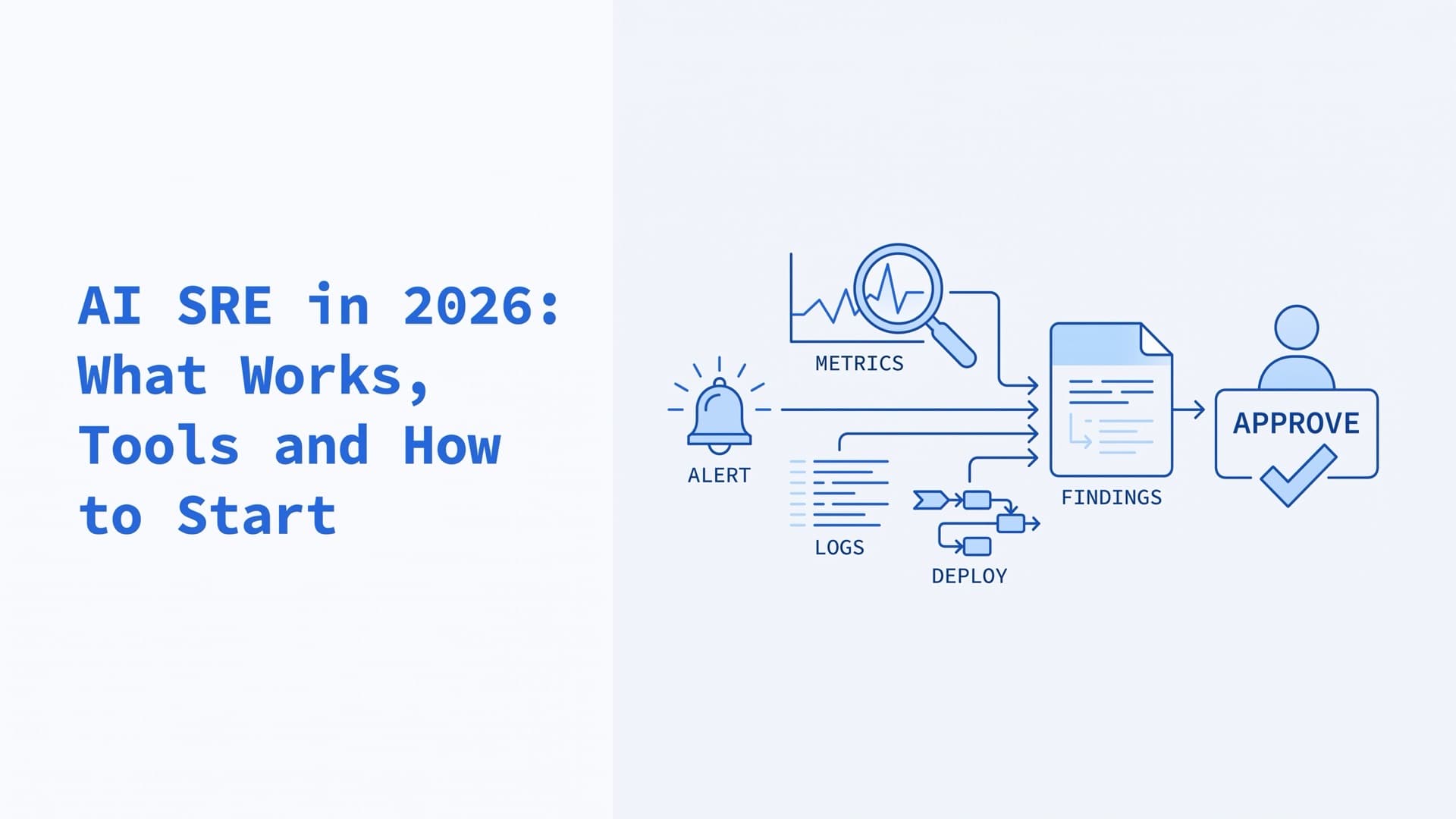
An AI SRE is an AI agent that takes on site reliability engineering (SRE) work. It investigates alerts and incidents across your monitoring, logs, deploys and tickets, then proposes or takes actions. Today it is useful for gathering evidence, suggesting likely causes and drafting postmortems. Fixing production on its own is still early, so keep an engineer approving every change.
This guide shows what works, where it fails, and how to test and run an agent safely. It names tools by category and ranks none of them. To choose a tool, skip to three ways to get one. All sources were checked in October 2026.
Our infrastructure team runs a long-term client's production systems with Claude connected through MCP (Model Context Protocol) servers for Grafana, VictoriaLogs, ClickHouse, GoCD and Proxmox. The Grafana, VictoriaLogs and ClickHouse servers are third-party. Separately, we wrote and published two MCP servers, for GoCD and for Bareos backups. Where this article describes our setup, it says so.
What does an AI SRE do?
An AI SRE takes an alert, pulls evidence from your tools, tests a few hypotheses and reports the likely cause with the evidence behind it. In a ClickHouse experiment, each investigation took between 6 and 27 database queries. Around that core, agents write summaries, postmortem drafts and handoff notes. Some can also run fixes.
| Task | Status in 2026 | Main caveat |
|---|---|---|
| Alert triage and context | Works now | Sees only data you keep |
| Root-cause hypotheses | Useful lead | Can lock onto one theory |
| Postmortem drafts | Works now | Check facts and timeline |
| Handoff notes | Works now | Needs chat and ticket access |
| Runbook tasks | Early | Needs scoped tools |
| Fixes without approval | Narrow cases | Only bounded, reversible actions |
Google SRE has published numbers from its own AI tools in production (paper). Its AI Alert system enriches alerts before an engineer sees them and works in read-only mode. An AI-generated incident hypothesis alone cut mean time to mitigate by 10% in Google's A/B test. Investigation dashboards, which build an incident-specific view on demand, cut it by roughly 44% for supported incidents. Google's incident agents also draft postmortems and write handoff documents for the next responder (Google Cloud blog).
Write-ups are the safest win. When ClickHouse asked models to write a root-cause report from a finished investigation, all of them produced "a solid first draft." Unattended fixes are the least mature part, for the reasons below.
Where AI SRE tools still fail
AI SREs fail in four common ways. They miss what your telemetry never recorded, and they sound sure when they are wrong. They can deepen an outage when they act alone, and their cost is hard to forecast.
The agent only knows what your telemetry kept
An agent cannot find a cause in data you never stored. ClickHouse, which sells observability storage, warns that "if your logs can't remember more than two weeks, neither can your AI SRE." The same goes for dropped fields such as request IDs, and for alerts without service names or deploy markers. ClickHouse's own experiment traced the models' misses to missing context, weak grounding and no domain specialization.
A newer test points the same way. In June 2026, Coroot, another observability vendor, gave eleven models the same prepared context for one incident. All three frontier models it tried named the root cause. Coroot concludes that "the hard part is the harness," meaning the data and tools around the model. It also notes that "one incident isn't a benchmark." Fix gaps in monitoring and alerting before you blame the model.
It can be confidently wrong
Models anchor on early ideas. In ClickHouse's test on injected faults, models tended to "lock onto a single line of reasoning," and some "hallucinated causes." ClickHouse published the test in August 2025 and kept it deliberately simple, with plain prompts and no added context.
Datadog reports a related failure from building its own agent. An early version made 12 tool calls, and one of them found the real cause. The summary still named the wrong one, because other calls returned suspicious errors from an upstream service. Datadog says its newer version names the right cause. A wrong lead also shapes where the team looks next. As SRE Lex Neva writes on Honeycomb's blog, a bad suggestion can "narrow my focus" and hide a more useful direction.
Acting alone raises the stakes
A wrong hypothesis costs minutes. A wrong action can extend the outage. Google's AI Operator acts alone only on minor incidents, and an engineer must accept its mitigations for critical operations. Azure SRE Agent defaults to Review mode, where an administrator approves infrastructure changes. The agent from incident.io can only open a pull request that a person reviews and merges.
Cost is hard to predict
Token use swings widely. In the ClickHouse test it ranged "from a few thousand tokens to several million" across models and scenarios. Pricing models differ too. AWS bills its agent by the second of active work, and Azure charges a fixed hourly baseline per agent plus usage. Datadog meters its agent in AI Credits.
We have one data point of our own, from routine work. In one recorded run, a backlog ticket cost about $3 in model usage against roughly six hours of an engineer's time. Measure cost per investigation in your own trial.
AI SRE vs AIOps
AIOps applies machine learning to operations data. In IBM's description, it detects anomalies, correlates events, separates real alerts from noise and helps find root causes. An AI SRE works one incident at a time. It calls your tools, follows the evidence and explains the likely cause in plain language.
| AIOps | AI SRE | |
|---|---|---|
| Works on | Streams of events | One incident at a time |
| Method | Statistics and ML | A model calling your tools |
| Output | Grouped alerts, anomalies | A likely cause, with evidence |
The two can run together. AIOps groups a flood of alerts into a few incidents, and an AI SRE investigates the ones that remain.
Will AI replace SREs?
Not with today's agents. Google runs agents on its own production incidents, and engineers still handle new and critical cases. Google expects the job to change. Its paper says SREs "must move up the abstraction ladder, transitioning from direct incident responders to architects of AI safety."
Incident response was never the whole job. Google's SRE book sets a goal of keeping operational work below 50% of each SRE's time. The rest goes to engineering projects. Agents can take over much of the repetitive evidence gathering. People keep the design work, the SLOs, the risk decisions and the agents themselves.
AI SRE tools: three ways to get one
You can buy a platform, turn on your cloud provider's agent, or build on open source and MCP servers. Platforms are usually the fastest start. Building gives you the most control and the most work.
| Platform | Cloud agent | Open source, MCP | |
|---|---|---|---|
| Your data goes to | Usually the vendor | Your cloud provider | Your servers, model API |
| It reaches | Its integrations | Its cloud, plus connectors | What you connect |
| Starts on an alert | Built in | AWS and Azure | You add it |
| Cost model | Credits, add-ons or quote | Agent time, usage | Tokens, your time |
| Lock-in | Medium to high | Medium to high | Low |
| Effort | Low | Low on that cloud | High |
Buy an AI SRE platform
AI SRE companies come from three directions. Pick by where your data already lives.
- Standalone agents, mostly from startups, connect to the tools you already run. Resolve AI says its agent goes on call and resolves incidents on your behalf. Cleric says it checks each production change and opens fix pull requests for approval. Traversal targets large enterprises with alert triage and root-cause analysis. Komodor offers an AI SRE inside its Kubernetes operations platform.
- Incident-management platforms add an agent to the incident record. PagerDuty's SRE Agent, generally available since October 2025, classifies incidents and recommends remediation. incident.io, Rootly and Harness correlate telemetry, changes and past incidents.
- Observability platforms add an agent over their own data. Datadog made Bits AI SRE generally available in December 2025 and now calls it Bits Investigation. Elastic offers early access to its nightshift AI SRE, and Splunk builds one into its Observability Cloud.
The vendor maintains the integrations, and in exchange it usually gets access to production data. Some, such as Traversal and Komodor, can also run inside your own environment. Ask where telemetry and prompts go and how long they stay. Ask which of your systems the agent queries directly and which only through integrations. Ask what a month of investigations would cost at your alert volume.
Use your cloud provider's agent
- AWS DevOps Agent became generally available on March 31, 2026. It investigates incidents across AWS, other clouds and on-premises systems. AWS bills it per second of active work. As of October 2026 that is $0.0083 per agent-second, about $30 per active hour. Queries it runs in services such as CloudWatch are billed separately.
- Azure SRE Agent connects to Azure resources, Azure Monitor, PagerDuty, ServiceNow and GitHub, and it reaches other tools through MCP. As of October 2026, Azure bills it at a fixed 4 Azure Agent Units per agent-hour, plus usage.
- Google Cloud's Gemini Cloud Assist investigations are in Preview. Since April 10, 2026, running one requires a Premium Support contract or access through your account team.
A cloud agent reads that cloud's resources and logs with little setup. Its reach beyond that cloud depends on connectors, and it ties your incident process to one provider. AWS DevOps Agent and Azure SRE Agent can both call MCP servers you add, so a custom server can serve your cloud's agent too.
Build on open source or connect an agent through MCP
Open-source agents run where you choose, with the model you choose. These four are on GitHub:
- HolmesGPT investigates alerts across Kubernetes, VMs, cloud services and databases. Robusta created it, it uses the Apache 2.0 license, and it joined the CNCF Sandbox in October 2025. Its README says it has read-only access by design. It also lists an optional add-on that applies Kubernetes fixes, each after a person approves it, and can open fix pull requests through GitHub.
- K8sGPT scans Kubernetes clusters and explains problems in plain English. It uses Apache 2.0, has been a CNCF Sandbox project since 2023, and can run as an MCP server.
- OpenSRE from Tracer is an Apache 2.0 framework for building your own AI SRE agents. It is a public alpha and can mask identifiers before calling an outside model.
- sre-agent from Fuzzy Labs is a smaller MIT project. It reads CloudWatch logs, checks your GitHub code and reports to Slack.
HolmesGPT, K8sGPT and OpenSRE all shipped releases in October 2026. The last sre-agent release was in March 2026. CNCF describes Sandbox projects as "experimental projects not yet widely tested in production," so plan your own testing.
The other way to build skips a dedicated product. You connect a general agent, such as Claude Code, to your tools through MCP servers. Each server exposes one system's actions to the agent, with the permissions you give it. Grafana Labs, ClickHouse and VictoriaMetrics maintain official servers for Grafana, ClickHouse and VictoriaLogs, all under Apache 2.0. Where no server exists, you write one. Our guide on how to build an MCP server walks through the two we published.
By default, a general agent runs when a person starts it. To investigate every alert, something has to start it when the alert fires, such as a webhook from your alerting system.
Agents also need your team's conventions. For a long-term client, we rolled out CLAUDE.md files, which Claude Code reads as standing instructions, across 17 repositories. The engineers who own the code wrote and cross-reviewed each one.
Building keeps your data on servers you control, except what the agent sends to the model provider. You choose the model and can switch it. You also own the evaluation, the upgrades and every guardrail. AWS argues that self-built setups drift because each engineer configures tools differently, "some thoroughly, some partially, some not at all." Keep one shared configuration in the repository.
How to test an AI SRE before you trust it
Replay incidents you have already solved. Give the agent the alert and the access your on-call engineer had, then compare its answer with the postmortem. Do this before it touches live alerts.
- Pick solved incidents. Use recent ones with written postmortems. Start with 10 to 20, and include a few where the team's first theory was wrong.
- Check that the data still exists. If the logs have aged out, the test only measures your retention.
- Hide the answer. Give the agent the incident's time window and the code as it was then. Keep the postmortem and the incident channel out of its reach. An agent that searches past incidents could otherwise look the answer up.
- Score each root cause. Mark each answer right, partly right or wrong against the postmortem. Partly right means the right service with the wrong cause. Google scores a mitigation as correct only when it matches the exact action, such as the specific binary and version.
- Count confident misses. Track separately the wrong answers given with high confidence. They do more harm than an answer that admits doubt.
- Run each case at least three times. Last9, which sells an AI SRE, warns that "the same incident can produce different diagnoses across runs."
- Time and price every run. Record the minutes to the first useful hypothesis and the tokens or agent time used.
- Shadow live on-call read-only. Let the agent post findings next to your engineers until its live hit rate matches the replay. Then grant write access one action at a time.
Ask vendors for the same evidence. Datadog says it scores its agent against real incidents labelled with their true cause. The incident.io team says it backtests against historical incidents daily. Ask to see results on incidents like yours.
How to run an AI SRE safely in production
Give the agent its own identity and the least access its tasks need. Put a person between the agent and every change. Log every call, cap how fast the agent can act, and keep an engineer responsible for each system it touches.
Google SRE grants autonomy in steps. An agent reaches the higher levels only after it proves itself on human-verified evaluation data.
| Level | The agent | People |
|---|---|---|
| L0 | Does not investigate | Investigate, approve, act |
| L1 | Investigates | Approve and act |
| L2 | Investigates and acts | Approve each plan |
| L3 | Acts alone in set cases | Handle new cases |
| L4 | Runs whole incidents | Not needed per incident |
Give the agent its own identity. Google says agents "must not operate with the standing, human-like credentials of their developers." Enforce limits in the backend, too. The ClickHouse MCP server runs queries read-only by default. Its README adds that "the security boundary is the ClickHouse user's grants." Grafana's MCP server can drop all write tools with --disable-write.
Approve every change. In the agent setups we build, each MCP server gets only the permissions its tasks need, and a human approves anything that changes state. The MCP specification says there "SHOULD always be a human in the loop with the ability to deny tool invocations." Check what your approval step covers. In Azure SRE Agent's Review mode, Approve and Deny buttons appear only for Azure infrastructure operations. Actions such as posting to Teams or querying outside data sources go ahead without them, unless you add hooks or tool access policies.
Preview before acting. Google requires agent-facing systems to support a dry_run=true mode, so people can see the blast radius first. Our MCP guide shows the confirm-then-execute pattern from our Bareos server.
Log every call. Record each tool call and its result, with secrets removed, where the agent cannot edit the log. AWS says its DevOps Agent keeps audit journals "that the agent cannot modify after recording."
Cap the rate. Google calls for "strict, agent-specific rate limits and automated circuit breakers" to stop runaway loops.
Treat tool output as untrusted. Logs and tickets contain text that anyone can write. Google lists prompt injection among the security risks of agents in production. Keep write tools behind approval, so injected text cannot trigger a change.
Keep a human owner. Google's AI Operator hands an incident to a person when it cannot find the cause. Name an engineer who owns each system the agent touches and reviews what it does.
Help connecting an AI SRE agent to your tools
We connect AI agents to the tools you already run, such as monitoring, logs, CI/CD, backups and tickets, through MCP servers. Where no server exists, we write one. Each MCP server gets only the permissions its tasks need, and a human approves anything that changes state. Our GoCD and Bareos servers are open source. We start with an audit of your tools and recurring work. After it, we offer a pilot or a larger piece of work. Tell us which systems your agents should reach. The first conversation is free.
Frequently Asked Questions
What is an AI SRE?
An AI SRE is an AI agent that handles the investigation side of site reliability engineering (SRE). It receives an alert, queries logs, metrics, traces, deploys and past incidents, and reports the likely cause with its evidence. Many also draft postmortems and handoff notes. Some can run fixes, ideally after an engineer approves them.
How do you use AI in SRE?
Start with investigation and paperwork. Let an agent enrich alerts, suggest root causes and draft postmortems with read-only access. Connect it to monitoring, logs, deploys and tickets through MCP servers or a platform's integrations. Test it on incidents you have already solved. Then allow approved, reversible actions one at a time.
Which AI tool is best for SRE?
No single tool fits every team, so start from where your data lives. Teams on one observability platform can try that vendor's agent first. Teams on one cloud can test AWS DevOps Agent or Azure SRE Agent. Google Cloud's investigations are in Preview. Mixed or self-hosted stacks suit a standalone platform, HolmesGPT or a general agent connected through MCP servers.
Is there a free, open-source AI SRE agent?
Yes. HolmesGPT and K8sGPT are CNCF Sandbox projects under Apache 2.0. HolmesGPT investigates alerts across many data sources, and K8sGPT focuses on Kubernetes. OpenSRE is an Apache 2.0 framework in public alpha. You can also connect a general agent to the official Grafana, ClickHouse and VictoriaLogs MCP servers. The model still costs money, through an API or your own hardware.
How much does an AI SRE cost?
Pricing models differ. As of October 2026, AWS bills its DevOps Agent at $0.0083 per second of active work. Azure charges a baseline of 4 Azure Agent Units per agent-hour plus usage. Datadog meters Bits Investigation in AI Credits. Open-source agents cost model usage plus your engineers' time. Measure cost per investigation during your trial.
Is AIOps still relevant?
Yes. AIOps tools detect anomalies, correlate events and cut alert noise across large environments. An AI SRE does a different job and investigates single incidents in depth. The two can run together. AIOps groups the alerts into incidents, and an agent investigates the incidents that remain.